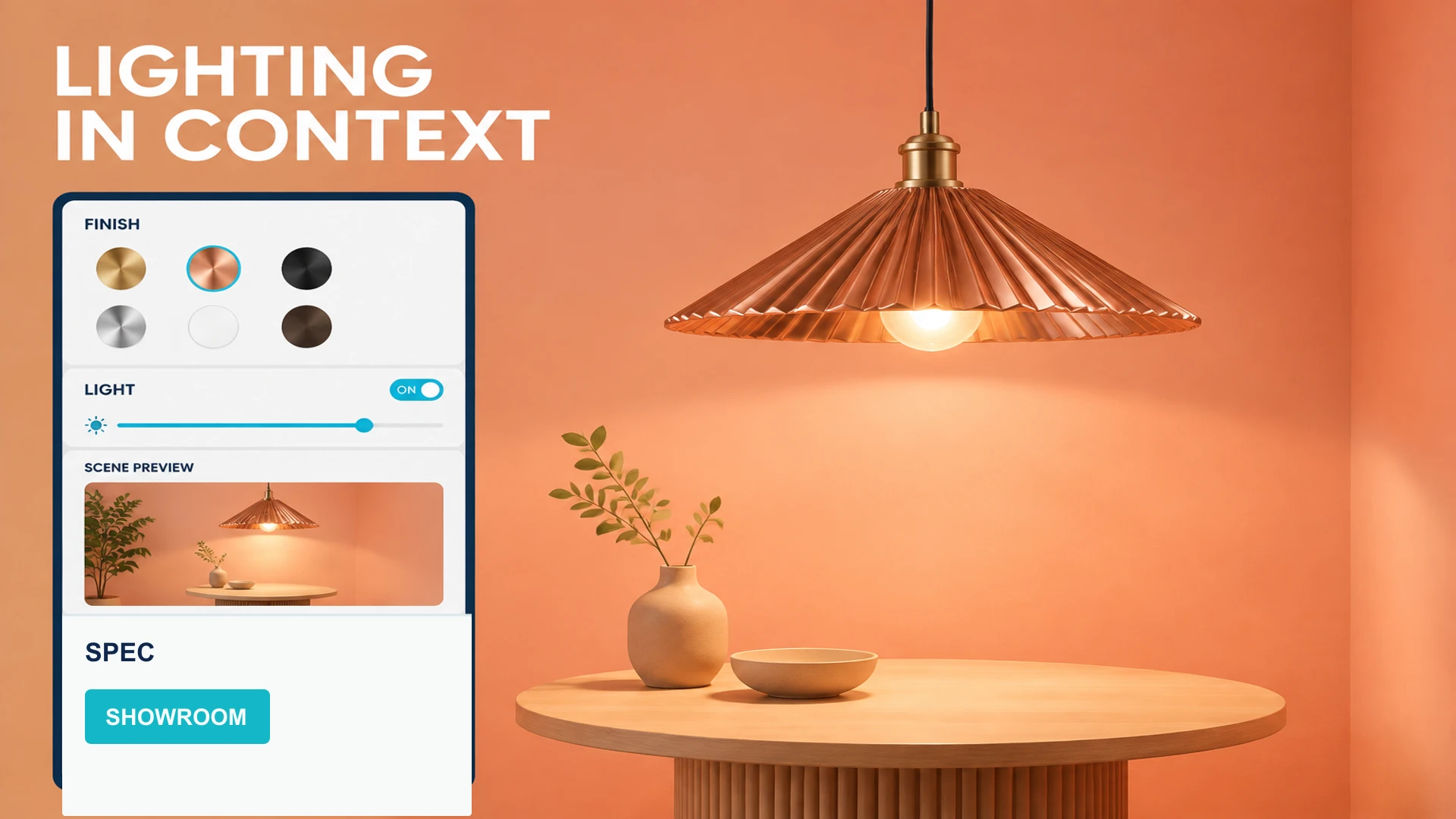
Lighting products are a natural fit for three-dimensional explanation. Buyers want to inspect the fixture itself, but they also care about metal, glass, wood or fabric finishes, installation methods, proportions and the way the product looks in a room. A white-background image rarely communicates all of that. A video gives a fixed viewpoint and cannot answer every question from a designer, distributor or procurement team.
A Web3D lighting product display brings the model, material states, scene context and product information into one browser experience. It can support a corporate website, showroom, distributor presentation or trade show touchscreen. The boundary is important: unless a project includes validated optical calculations and measured data, a Web3D display should communicate visual appearance rather than claim to replace photometric or lighting simulation software.
What a lighting display should communicate
Finish and surface treatment
Surface detail affects how customers perceive lighting quality. A viewer can provide approved states for black, white, metal, wood, glass or fabric finishes, allowing visitors to compare color, roughness and reflections. Material options should match the real catalog rather than showing attractive finishes that cannot be manufactured.
Size, installation and combinations
Pendant, wall, track, outdoor and linear lighting products have different installation contexts. Dimension labels, mounting directions, bracket options and scene scale can help designers and buyers understand how a product enters a space. A product family may also support combinations of fixtures, lengths or accessories, provided the available range and incompatible combinations are explicit.
Light-on states and scene mood
A display can offer off, on, color-temperature or brightness previews to show how the product and scene may look in different states. Without a validated optical model, these states should be described as visual previews, not as measured illuminance, beam angle or photometric output. Technical performance should remain grounded in specification sheets, test reports and certification documents.
Design the experience for three channels
Website product pages: help visitors choose
A website experience should start with product models, sizes, finishes and mounting options so visitors can narrow their choice quickly. The viewer can sit beside specifications, application scenes, downloadable documents and an enquiry CTA. On mobile, prioritize reliable rotate, zoom, material switching and readable text instead of a heavy background that slows the page.
Showrooms and exhibitions: help staff explain
An exhibition screen can place fixtures inside residential, hospitality, retail or outdoor scenes, helping visitors compare mounting positions and combinations. Staff need to jump between products, hotspots and scenes, then reset the view quickly. For unreliable venue networks, the exhibition interactive 3D screen development guide covers offline packaging, touch interaction and field maintenance.
Sales tablets: support proposal conversations
Sales teams do not always need to expose every control. They need to answer questions about dimensions, finishes and combinations quickly. A salesperson can place several fixtures in one scene, save the selected product, share a link or QR code and pass specification and enquiry data to the next step. The optimized asset can then be reused across the website, tablet and booth versions.
Useful lighting Web3D interactions
- 360-degree rotation, close inspection and preset camera views.
- Finish, color, shade and accessory switching.
- Pendant, wall, track or outdoor installation states.
- Light-on, color-temperature and scene previews with clear visual-demo labeling.
- Hotspots, dimensions, specification downloads and enquiry actions.
- Product-family comparison, scene switching, QR sharing and one-tap reset.
Do not place every feature on the first screen. Start with the exterior and installation context, then reveal finish and scene choices, and finally guide visitors to specifications and an enquiry. For a product range, keep the catalog, model states and accessory rules in a maintainable data structure so new SKUs do not require rebuilding the entire page.
Performance and accuracy checks
Glass, metal and translucent shades require more careful material treatment, but transparency, reflections, shadows and high-resolution textures can raise real-time rendering cost. The delivery process should compress textures, control material count, remove hidden geometry and test desktop, mobile, tablet and exhibition hardware. Our guide to optimizing 3D models for the web covers the general asset workflow.
Before launch, the product or design team should verify model names, colors, dimensions, mounting methods and specifications. Web3D helps visitors understand a product visually; measured lighting performance should come from the company's technical documentation and test data. Clear boundaries make the experience more credible and useful.
The value of a lighting Web3D display is connecting what a product looks like, where it is installed and how a buyer chooses it. With consistent models, materials, scenes and product data, it becomes a reusable tool across product pages, exhibitions and distributor conversations. To plan a lighting display, review the Web3D product viewer solution or contact WESHOW3D through the services page.