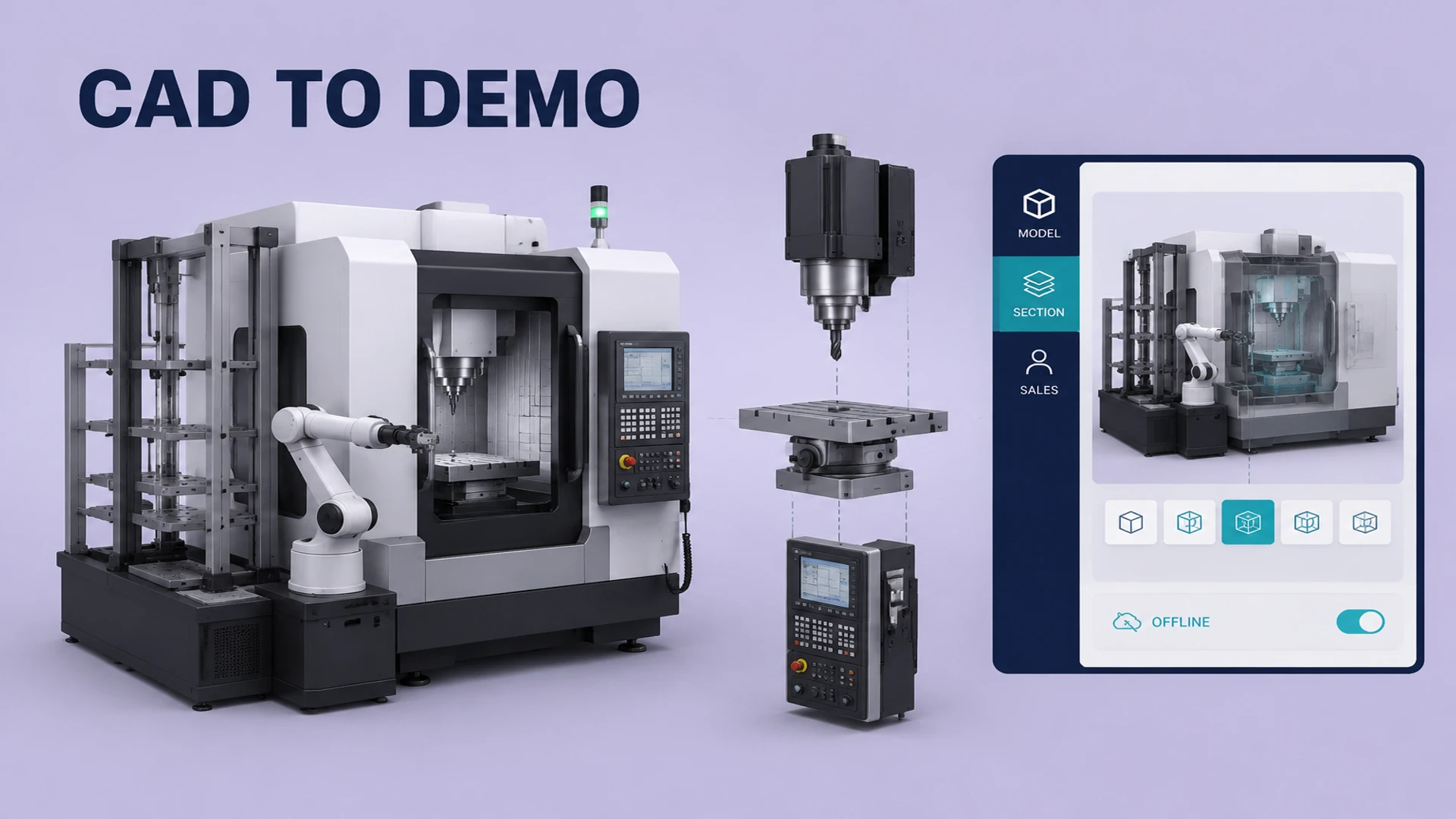
Industrial equipment sales often require an explanation of operating principles, product structure, installation and application context. Yet a large machine may not be practical to ship to every exhibition or customer meeting. It may require lifting equipment, power, ventilation or safety controls, and a real demonstration may not fit the venue schedule. Photos communicate the outside; videos communicate a fixed sequence; buyers still need a tool that lets them inspect the details that matter to their own decision.
An industrial equipment Web3D display turns existing CAD or 3D assets into an interactive browser experience for a product page, sales presentation or exhibition kiosk. The work is not about placing raw engineering data on a website. It is about reorganizing the model and information around the way a B2B buyer learns about the product.
What industrial Web3D should help buyers understand
What the equipment is made of
Layers, exploded views and hotspots can explain frames, modules, pipes, interfaces and safety components. A visitor can start with the complete machine, then enter a subsystem without searching through a complicated engineering drawing. For product families, a comparison flow can show which modules and interfaces change between models.
How the equipment works
Industrial value often comes from what happens inside the enclosure. Controlled camera states and step-based animation can show material flow, component movement, airflow or system connections. These animations should be based on approved engineering information and should clearly remain explanatory demonstrations rather than complete engineering simulations.
How sales can present the product without a physical sample
Sales teams can open the product experience on a tablet or laptop, jump to a customer question and reset the scene when the conversation changes. At a trade show, a large display can present a complete product portfolio while reducing the need to transport heavy prototypes. For a broader set of browser-based product display capabilities, see our Web3D product viewer solution.
Turning CAD into a web-ready asset
1. Define display layers
Not every bolt in a CAD file needs to be visible online. Divide the content into overall, system, component and detail layers, then prepare camera states and explanations for each. Visitors can see the commercial story first while technical buyers can continue into the structure, keeping both interaction and loading under control.
2. Clean and reorganize the model
Engineering assets commonly contain repeated geometry, hidden parts, dense surfaces and materials that are expensive to render in real time. A web asset pipeline may remove irrelevant geometry, reduce unnecessary polygons, consolidate or separate materials, rename objects, create a usable hierarchy and export GLB or glTF. Parts that need hotspots or animation must remain addressable; merging everything only to reduce file size can make future interaction impossible.
3. Prepare device-specific quality levels
An exhibition display, sales tablet and mobile website do not have the same hardware. A high-performance host can use a more detailed texture set while mobile devices receive a lighter version with deferred or progressive loading. Our guide to optimizing 3D models for the web covers geometry, textures, loading order and device testing in more detail.
Useful industrial product interactions
- Hotspots and specification cards: Explain component names, materials, dimensions, selection limits and supporting documents.
- Exploded and layered views: Show assembly relationships and maintenance positions.
- Sectional and transparency states: Reveal hidden structure while keeping the visual hierarchy controlled.
- Operating-principle animation: Demonstrate approved motion, flow or process steps.
- Model and module comparison: Help buyers compare functions, interfaces and configuration ranges.
- Documents and enquiry actions: Connect understanding to specification downloads, demo requests and quotation conversations.
The more interaction an industrial display contains, the more important navigation and reset become. At an exhibition or sales meeting, a visitor may interrupt the planned sequence with a specific question. Staff should be able to return to the overall view from any state instead of forcing the application to play a fixed animation from the beginning.
Reusing the display online and offline
The most useful delivery is rarely a one-off exhibition demo. A structured 3D asset and content system can support an offline booth package as well as an online product page, catalog or sales link. Models, hotspots and copy can be shared, while screen layout, loading, permissions and data capture are adapted for each channel.
If the exhibition version includes a QR code, it should open the relevant online product page and preserve a clear path to the model, documents or enquiry form. For energy and equipment solutions, the Sungrow energy solution project is a useful reference for placing equipment within a larger system story rather than showing an isolated object.
Project inputs to prepare
- CAD, STEP, FBX, OBJ or existing GLB/glTF files, together with usage rights and publishable scope.
- Product specifications, component names, installation instructions, operating flow and approved talking points.
- Target devices, display resolution, touch requirements, offline requirements and languages.
- Website, exhibition application, download, enquiry or CRM integration requirements.
- Acceptable loading time, visual fidelity, maintenance ownership and post-launch content update process.
Industrial equipment Web3D is valuable when a complex product needs to remain understandable, demonstrable and reusable across sales situations. Converting CAD is only the first step; the result depends on information hierarchy, interaction tasks, performance boundaries and the handoff to sales. Share your model and target scenario through the WESHOW3D services page to define the right scope.